

























AI & Data Protection
At a glance
- Never upload images or videos of pupils or staff to an AI tool.
- You may use reputable AI tools for generic lesson planning, teaching resources and Public data, provided they meet WeST’s basic requirements.
- For anything involving Internal, Confidential or Highly Confidential data, use only a tool and purpose covered by an approved DPIA.
- Check all AI-generated content carefully. You remain responsible for anything you use, share or publish.
- If you accidentally enter sensitive information into an unapproved tool, report it immediately to the DPO.
Two Simple Rules
"What am I allowed to do with AI?" is a simple question with a complex answer... AI tools change quickly, so detailed guidance soon becomes outdated.
Instead, use these two simple rules to recognise what is safe:
The ‘Know your tools’ guidance focuses on stand-alone AI tools such as Copilot Chat, ChatGPT, Claude and Gemini. AI features enabled by WeST or your school within systems such as Arbor will already have gone through the appropriate data-protection checks.
1. Know your data
WeST classifies its data into four categories: Public, Internal, Confidential, and Highly Confidential. Most files and emails will not have a visible classification label; their classification is implied by their nature, source and content.
Images and videos of pupils or staff are personal data too, and carry a heightened risk of misuse.
Never upload them to an AI tool, even if no names are shown.
Across WeST, we mostly use Internal or Confidential data. Information about identifiable individuals, including names, personal information and performance or assessment data, will normally be Internal or higher. The same applies to commercially sensitive information, including financial information, unless it has been explicitly approved for public release by an authorised person.
We also use a lot of Public data. This includes material intended for release, such as newsletters, curriculum and teaching resources we have created and are entitled to share publicly, and information deliberately published for unrestricted public use such as national statistics.
Highly Confidential is reserved for the most sensitive information we hold, such as safeguarding records or HR grievance case notes.
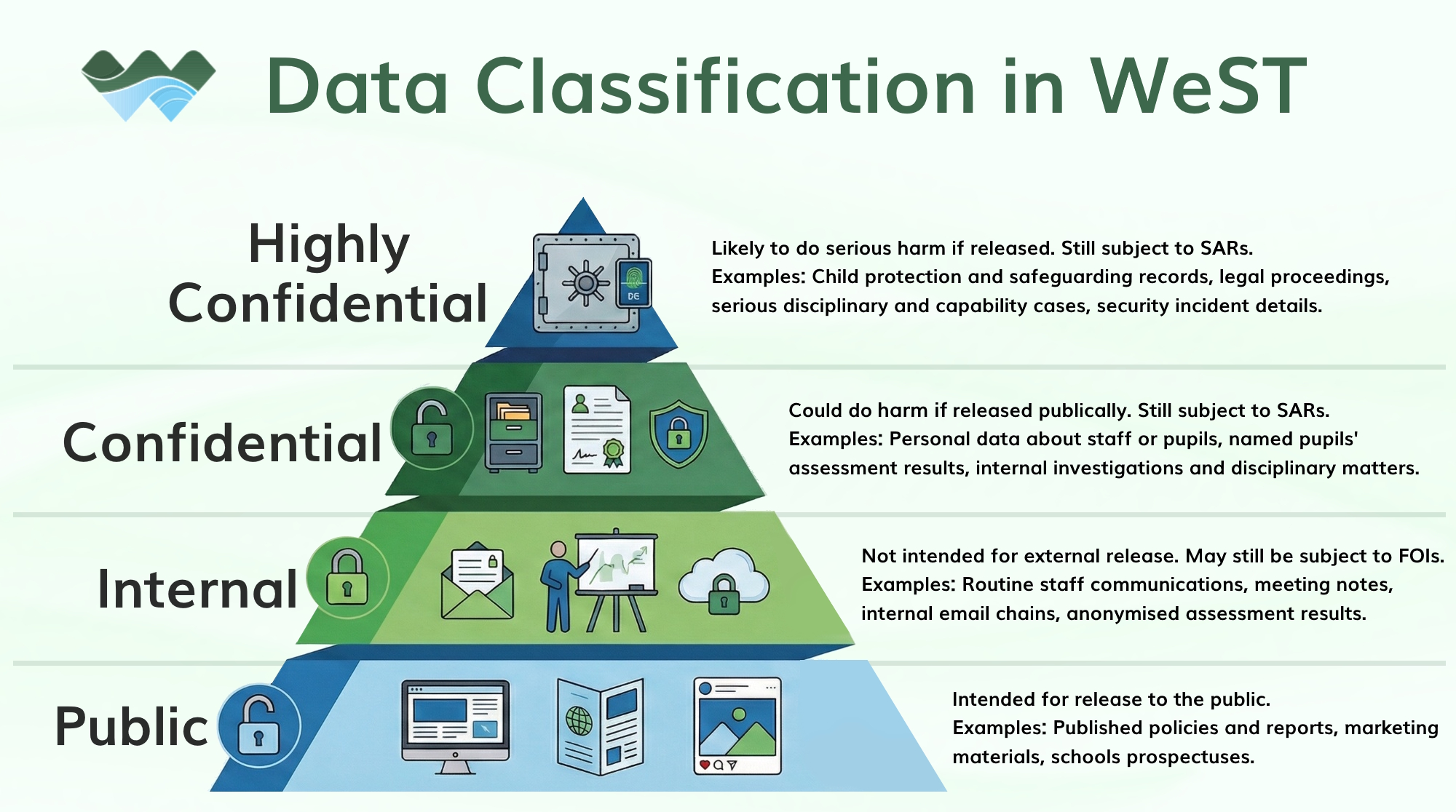
The higher the classification, the greater the harm a data breach could cause. Putting Confidential or Highly Confidential information into an unapproved tool is against WeST policy and may result in a personal data breach.
If you ever believe there has been a data breach, report it immediately so that we can assess and limit any risk:
DPO-WeST@westst.org.uk
2. Know your tools
Only some AI tools are safe for non-public data. WeST has enterprise data-protection agreements with suppliers such as Microsoft, Google and Arbor. Before adopting any new system that may access our more sensitive data, we must complete a Data Protection Impact Assessment (DPIA). This includes adopting new features of existing systems that were not covered by the original DPIA.
Be especially wary of free AI tools. They are likely to provide fewer protections, and may be making money from your data.
| Data Classification | Can I use AI with this data? | Approved AI Tools | Mandatory Safeguards (see below) |
|---|---|---|---|
| Public | ✅ Yes | Microsoft 365 Copilot, Google Gemini, NotebookLM, ChatGPT, Claude... Any tool that meets WeST's basic AI requirements (see below) |
Always verify quality and accuracy before releasing or making decisions based on AI-generated content. |
| Internal | ✅ Yes (with care) |
Microsoft 365 Copilot, Google Gemini, NotebookLM | As above, and must be logged in to the platform with your School/WeST account, not a personal or guest account. |
| Confidential | ⚠️ Limited | Microsoft 365 Copilot | All of the above, and must be used with Work M365 Copilot only (via Chat, or using Copilot hosted within apps like Word and Excel). |
| Highly Confidential | 🚨 Very limited | Microsoft 365 Copilot | All of the above, but only where necessary and for the approved purpose. Use the minimum information needed. |
Basic AI Tool Requirements
AI tools used for work across WeST must be legal, suitable for business use and fulfil the following minimum requirements. These requirements do not make a tool approved for pupil, staff or other non-public information, but they help protect the Trust’s reputation by setting reasonable minimum expectations.
All AI tools used for any work purposes across WeST must fulfil all the following criteria:
- Explain how personal data is collected, used and protected.
- Permit business use.
- Provide general information about the sources used to train the AI model.
- State whether users’ inputs are used for training.
You can ask an AI tool to direct you to its Privacy Information and Terms pages. Always check the actual provider’s published information, rather than relying on the AI to tell you. If you are unsure, ask ICT or the DPO.
Summary
For lesson plans and resources that contain no pupil or staff information, or when working with any Public data, you may use any reputable AI tool that meets WeST’s basic requirements.
For any other use, the tool and purpose must be covered by a completed and approved DPIA.
These rules apply to all software, platforms, tools and services, not only AI. You must never input Internal, Confidential or Highly Confidential data into any software, platform, tool or service unless that tool and use are covered by a completed and approved DPIA.
Additional Information
(click the headings to expand)
Stop & Think: common examples
I want AI to rewrite an email about a pupil.
The email may contain personal or sensitive information. Use only an AI tool approved for that data and purpose, such as Copilot while logged into your WeST account. Do not paste it into a public AI tool. Removing the pupil’s name may not be enough if they could still be identified from the details.
I want AI to analyse Question-Level Analysis data to identify weak topics.
QLA data may include pupil information and unpublished school performance data. Use an approved tool, such as Copilot within Excel.
Do not upload identifiable or school-level QLA data to an unapproved AI tool. An unapproved tool should be used only where the data has been reduced to question- or topic-level information and contains nothing that could identify a pupil, class or school.
I want AI to create or improve a worksheet or teaching resource.
This is usually acceptable where the resource contains no personal or confidential information and you have the right to upload it. Do not upload commercially purchased resources or pupil work unless the approved process specifically allows it. Check the output for accuracy before using it.
I want to use AI to mark work, write reports or make decisions about pupils or staff.
AI may support these tasks only where an approved tool and process are in place. It must not make important decisions by itself. A member of staff remains responsible for checking the information, applying professional judgement and making the final decision.
I want AI to summarise meeting notes or minutes.
Meeting notes may contain personal, safeguarding, staffing or commercially sensitive information. Use only an approved tool, such as Copilot within Microsoft Teams. Do not paste confidential notes into a public or unapproved AI tool, even if the meeting itself was routine.
Mandatory Safeguards explained
| Safeguard | Reason |
| Verify quality and accuracy before releasing or making decisions based on AI-generated content. | AI can produce information that appears convincing, but is incorrect, incomplete or biased. You remain responsible for checking that anything you use is accurate and appropriate. |
| You must be logged in to the platform with your WeST account, not a personal or guest account. | We use AI in our work and personal lives. Using your work email to log in to services helps ensure work material and your personal usage are kept separate, and one can be deleted without losing the other. This is basic, healthy work/personal separation. |
| Must be used with Work M365 Copilot only (via Chat, or using Copilot hosted within apps like Word, Excel and Outlook). | With any sensitive information, the more copies there are and the more often it is copied into other platforms and services, the greater the risk of accidental release. Copilot is built into our Microsoft 365 environment, and so can work with data within our tenancy without any need to export it elsewhere. |
What is a DPIA?
A Data Protection Impact Assessment (DPIA) is similar to a health and safety risk assessment, but for data. Before a new system is bought or used, it checks what information it may access, how and why that information will be used, who can access it, how it will be stored, shared and deleted, and what safeguards are needed. UK GDPR requires DPIAs for higher-risk uses of personal information, and WeST requires one for every new platform that may access our data. Our pupils and staff trust us with their personal information. DPIAs help us make sure we use it responsibly and keep it safe.
We are also required to update a DPIA if a platform we are currently using introduces new functionality not covered by the original DPIA.
The person proposing the platform must write or update the DPIA, with advice from the supplier. The DPO must review and approve it before any agreement is made or features used.
Learn more from the Information Commissioner’s Office – Data Protection Impact Assessments.
Other Frequently Asked Questions
Can I install apps, such as Claude Cowork, that give AI tools access to my work device?
At present, no. Do not install any software that can access files, applications or other data on your work device unless it has been approved and made available by WeST.
Microsoft is introducing additional AI functionality within Microsoft 365. We will make approved tools available when we are satisfied that they are sufficiently mature and safe. We do not recommend installing unapproved agentic AI tools on personal devices used for work either.
What are 'Agentic' tools?
Agentic tools are AI tools that can take actions rather than only provide answers. For example, they may be able to open or create files, edit documents, manipulate spreadsheet data, access other applications or send messages on your behalf.
This can make AI much more useful, but it also increases the risk of the tool accessing the wrong information or taking an incorrect or unintended action. Agentic tools must therefore be specifically approved before being installed or used with WeST data.
Why are images and videos treated as particularly sensitive?
Once an image or video is uploaded to an AI tool, we may lose control over how it is stored, analysed or reused. It could be used to identify someone, create convincing false or altered content, imitate their appearance or voice, or reveal information about their identity, location or circumstances.
Misuse could cause distress, embarrassment, reputational damage or serious safeguarding concerns. Children may be particularly vulnerable, and the effects can be difficult or impossible to reverse once content has been shared or reproduced.
Is removing someone’s name enough to make information safe to use with AI?
No. A person may still be identifiable from other details, such as their school, year group, role, circumstances or the content itself.
Removing names also does not make confidential information Public. Internal assessment results, behaviour information, staffing matters or unpublished school data could still cause harm, embarrassment or reputational damage if disclosed. Only use the information with an AI tool approved for that type of data and purpose.
Can I paste an email, document or piece of pupil work into an AI tool?
Only if the information is Public, or the tool has been specifically approved for that type of data and purpose. Removing the sender’s or pupil’s name may not be enough if they can still be identified from the content.
Pupil work may also be protected by copyright, so do not upload it unless the approved process specifically permits this.